Process documentation software: how to choose and use it
Process documentation software comes in five shapes. Here's what each is for, what good process documentation contains, and how to keep it from going stale.
TL;DR. Process documentation software is the tool you use to capture how repeatable work gets done — onboarding, deploys, the monthly close — and keep it somewhere people can find it. It comes in five shapes: click-recorders, visual mappers, BPM tools, training platforms, and plain wikis. The right one depends on what you're documenting. But the tool is the easy part: every category nails capturing a process and most ignore keeping it current, which is the only part that decides whether anyone trusts the doc six months later.
Every team has a process that lives in exactly one person's head, and every team finds this out the week that person is on holiday. Process documentation software is how you get the process out of the head and into a place the rest of the team can read it — the tools for capturing, storing, and maintaining the step-by-step record of how your work actually gets done.
There are a lot of these tools, and the listicles ranking them run to seven thousand words. This post is shorter and differently shaped: what the software actually is, the five kinds of it (so you can pick the right kind), what good process documentation contains, how to write it, and the part every tool undersells — keeping it from rotting.
What process documentation software actually is
Process documentation software is a tool for recording repeatable work as step-by-step instructions and storing them where the team can find and update them. It turns how we do this from tribal knowledge into a written, searchable, repeatable record — a standard operating procedure (SOP) anyone can follow without tapping the one person who knows.
That's the category. Underneath it sit five fairly different kinds of tool, and most "best software" lists flatten them into one ranked column — which is how teams end up buying a screen-recorder when they needed a wiki, or a flowchart tool when they needed a checklist that runs. The next section is the fix.
The five shapes of process documentation software
Not a ranked list of twenty products — the five shapes, mapped to what you're actually documenting. Pick the shape first, then the product.
- Click-recorders (auto-capture). You do the task once; the tool watches and turns your clicks into a screenshotted how-to. Scribe, Tango, Whale. Brilliant for here is the exact UI path documentation — software walkthroughs, app onboarding. Weak when the process is a decision, not a click-path.
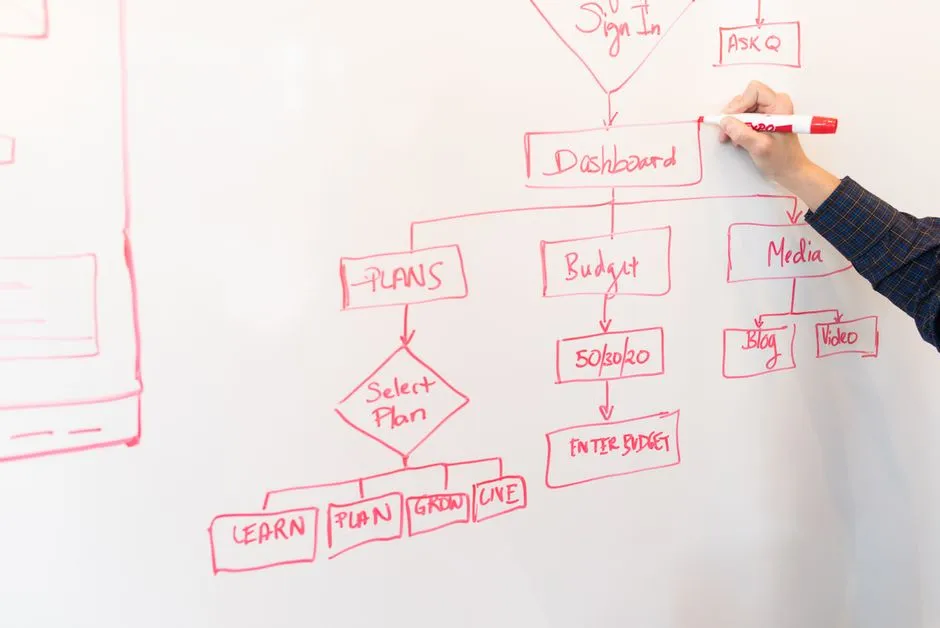
- Visual mappers (diagramming). Boxes, arrows, swimlanes — the flowchart view of a process. Lucidchart, Visio, Bizagi. Right when the process branches and you need to see the shape — an approval flow, an incident escalation path. BPMN is the standard notation if you go this route.
- BPM / workflow tools (the process runs itself). The document is executable — a checklist that assigns steps, enforces order, and tracks completion. Process Street, ProcessMaker. Right for recurring operational processes with hand-offs: client onboarding, the monthly close.
- Training platforms (SOP libraries). Built around onboarding — process docs plus assignments, quizzes, and who has read what. Trainual, SweetProcess, Waybook. Right when the documentation's main job is getting new people up to speed.
- Wikis (write it as prose, keep it with everything else). The process lives as a page next to your runbooks, decisions, and onboarding docs. Confluence, Notion, Raccoon Page. Right when the process is reasoning and steps and needs to stay findable beside the rest of your knowledge — which, for most internal processes, it does.
Most teams need two of these, not one: a click-recorder for the UI-heavy stuff and a wiki for everything that's a judgement call. (The one combination nobody needs is all five. That's not a documentation stack; that's a documentation hobby.)
What good process documentation actually contains
The tool captures steps. Whether the steps are any good is a separate question, and it's the one that decides if the doc gets used. A complete process document has:
- A purpose line. What this process is for and when you'd run it, in one sentence at the top.
- A trigger. The thing that starts it — a customer requests a refund, it's the first business day of the month.
- The steps, in order. Each one concrete enough to follow
without asking: what to do, where, and what success looks like.
Run
deploy prod; wait for the green check; confirm the health endpoint returns 200. - An owner. The named person responsible for the process being correct. Unowned process docs are how you get three contradictory versions of the deploy steps.
- Exceptions and edge cases. What to do when the happy path doesn't happen. This is the section that separates a real process doc from a screenshot of someone's good day.
- A last-reviewed date. So a reader can tell whether they're following the current process or a fossil.
A runbook is just a process document for the operational stuff; our how to write a runbook post goes deep on the step-and-expected-output shape, and Raccoon Page ships a service runbook template if you want the scaffolding. The broader what belongs in your internal docs question lives in the internal documentation post.
How to document a process, in seven steps
The recipe, minus the part where it becomes a quarterly initiative with a steering committee.
- Pick a process that hurts. Start with the one that broke last time someone was out, not the one that's easiest to write. Pain is the prioritisation.
- Watch it happen once. Do the process, or sit with someone who does, and write down every step — including the ones they do without thinking. The undocumented steps are usually the load-bearing ones.
- Write the steps in order, concretely. What to do, where,
and how to know it worked. "Deploy the service" is not a step;
"run
deploy prodand confirm the health check is green" is. - Name the owner and the trigger. Who keeps this correct, and what kicks it off. Two lines that save a dozen Slack questions.
- Add the exceptions. The refund that's past the window, the deploy that fails the health check. The edge cases are where the documentation earns its keep.
- Put it where the work happens. Not in a personal drive, not in a folder nobody opens — in the team's wiki, next to the related processes, where search will find it.
- Set a review date. Pick a cadence — quarterly for stable processes, after every change for volatile ones — and put the next review on someone's calendar. This step is the one in the next section, and the one everyone skips.
For documenting a whole body of processes rather than one, the how to build a knowledge base and internal knowledge base posts cover the system-level version.
The part no tool fixes: keeping it current
Here's what the twenty-tool listicles bury. Every category of process documentation software is good at capturing a process. None of them keeps it current for you. And a process document that's out of date is worse than none — it's wrong with confidence, and the team learns to ignore it, which quietly poisons trust in every other doc you have.
The decay is real and it varies by process. A deploy runbook rots the day someone changes the deploy. An onboarding checklist drifts every time a tool changes. The fix isn't a feature; it's a habit — an owner, a review date, and a tool that makes the last updated signal impossible to miss so a reader can tell live from fossil at a glance.
Which is where the where it lives question stops being cosmetic. A click-recorder captures the UI path beautifully and then leaves it in a library nobody revisits. For pure screen-capture SOPs, a dedicated recorder like Scribe or Tango is the right tool — that's genuinely not us. But the process documentation that's reasoning and steps and judgement — most of it — belongs in the wiki where your team already looks things up, next to the runbooks, the decision records, and the onboarding docs. Findable, versioned with full history and one-click revert so you can see what the process said last quarter, and fast: sub-second loads, keyboard-first, because a process doc nobody can open quickly is a process doc nobody opens. The public GitLab handbook is the canonical proof that a company can run on written process when the process lives somewhere everyone can reach.
If your processes are scattered across Google Docs, personal Notion pages, and three people's memories, the Confluence import and Notion import pull the written ones into a single searchable place in under ten minutes. The work management post covers the broader discipline of running a team on what's written down.
Things people actually ask
What is process documentation software? A tool for capturing repeatable work as step-by-step instructions and storing it where the team can find and update it. It turns how we do this from tribal knowledge into a written, searchable SOP. It comes in five shapes — click-recorders, visual mappers, BPM tools, training platforms, and wikis — that suit different kinds of process.
What is the best process documentation software? There isn't one — there's a best shape for what you're documenting. Click-recorders (Scribe, Tango) for UI walkthroughs; visual mappers (Lucidchart) for branching flows; BPM tools (Process Street) for executable checklists; training platforms (Trainual) for onboarding; wikis (Confluence, Notion, Raccoon Page) for prose processes that live beside your other docs. Most teams use two.
How do you document a process? Pick a process that hurts, watch it happen once and write every step, record the steps concretely with an owner and a trigger, add the exceptions, store it where the work happens, and set a review date. The concreteness and the review date are the parts that decide whether the doc survives contact with reality.
What is the difference between a process document and an SOP? Very little. An SOP (standard operating procedure) is a formal name for a process document — usually one with a fixed template and a compliance flavour. Process documentation is the broader term covering SOPs, runbooks, workflow maps, and onboarding guides. If someone asks for an SOP, they want a process document with the headings filled in.
Can I use a wiki for process documentation? Yes, and for most internal processes it's the right call. A wiki keeps the process next to your runbooks, decisions, and onboarding docs, makes it searchable, and versions every change. The exception is pure UI walkthroughs, where a click-recorder captures the screenshots faster than you'd write them.
What are some process documentation examples? A deploy runbook, a customer-onboarding checklist, an incident-escalation flowchart, a monthly-close procedure, a content-publishing workflow, an expense-approval process. The common thread: repeatable work, more than one person needs to do it, and getting it wrong costs something.
How often should process documentation be updated? On change, plus a periodic review. Volatile processes (deploys, anything touching a fast-moving tool) get re-checked every time they change; stable ones get a quarterly review. The mechanism that matters is a named owner and a visible last reviewed date, so readers can trust what they're following.
Process documentation software is genuinely useful, and there's a right shape of it for whatever you're trying to write down. But the tool only ever does half the job — it captures the process. Keeping the process true is a habit, not a feature, and the habit needs the doc to live somewhere fast, findable, and next to everything else your team relies on.
That last place is the one we built. Raccoon Page Free is three users, one space, 50 pages, and no card — enough to move your runbooks, SOPs, and onboarding processes into one searchable wiki with version history, so the next time someone's on holiday, the process is on the page instead of in their head. The tool captures the steps. The wiki is where they stay true.
Written by The Editorial Raccoon — house style for Raccoon Page. Numbers and claims pulled from product reality; jokes pulled from the Raccoon Corp canon. No raccoons were quoted in real life.