Planning board: what it is, how to make one work
A planning board makes the team's near-future work visible. Here's what it is, the four shapes that actually work, and where the source-of-truth lives.
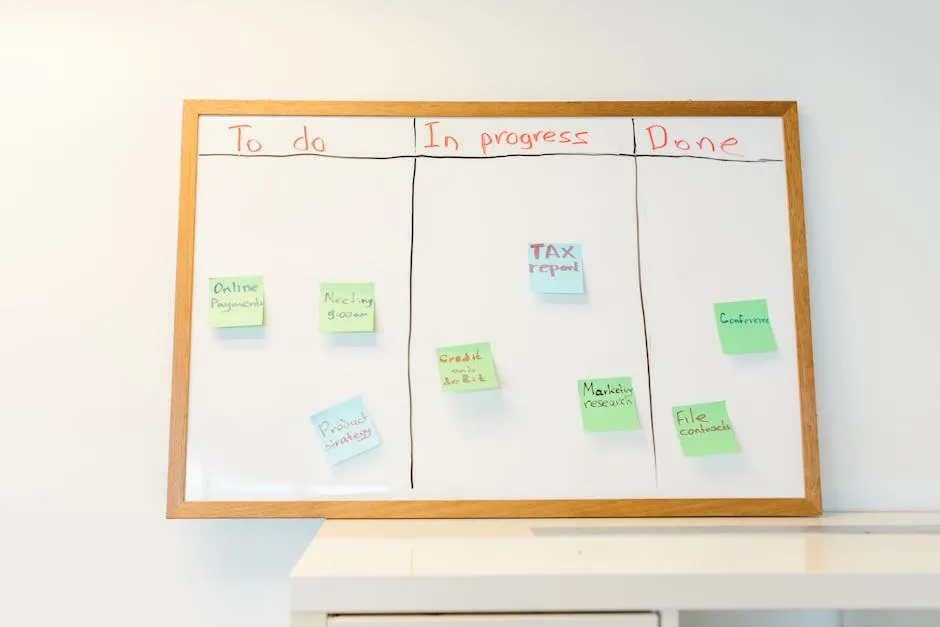
TL;DR. A planning board is a visual surface that shows what your team is working on, what's coming next, and what's finished. The four shapes that actually work in 2026 are kanban boards (continuous flow), scrum / sprint boards (time-boxed iterations), capacity boards (the team-as-pool shape), and roadmap boards (the multi-quarter view). Pick the shape that matches the team's actual cadence — not the shape your software defaults to. The board shows what's in flight; the durable agreement about what done means and how decisions get made lives in the wiki.
The phrase planning board is doing a lot of work in 2026. For an engineering team running Jira, it's the Scrum surface on top of the sprint backlog. For a kanban-flavoured ops team it's the lanes on the wall. For a product team running a quarterly cycle it's the slide deck the VP keeps updating. All three are real; all three are different things; all three are routinely confused for one another in software, methodology, and procurement conversations.
This post covers what planning board actually means in 2026, the four shapes the category collapses to, what makes a planning board work (regardless of shape), where the supporting agreements live, and the common anti-patterns that turn a planning board into wallpaper.
What "planning board" actually means
A planning board is a visible surface — physical or digital — that shows the team's near-future work and its state. The full sentence is a shared, persistent representation of the work units the team is committing to, their assigned owners, their current status, and (usually) their order or priority, arranged so that everyone on the team can see the whole at once. The short sentence does most of the work. The long sentence captures what makes a planning board different from a list, a calendar, or a backlog.
A few clarifications the SERP routinely flattens:
- A planning board is broader than a kanban board or a scrum board — those are two specific shapes.
- A planning board is broader than a sprint board — a sprint board is one type of planning board for a Scrum team.
- A planning board is not the same as a roadmap — but a roadmap board is a shape of planning board, just at a longer time horizon.
- A planning board is not the same as a whiteboard, even if it's physically a whiteboard with sticky notes. The board-ness is the columns-and-cards structure, not the physical material.
Planning board, plan board, agile planning board, sprint planning board, kanban planning board, what is a planning board — the search engine treats these as near-synonyms because intent-wise, they cluster. We treat them as one question: what shape of planning board does your team need, and what does a working one look like.
For the broader buying side, see our project management tools roundup (every shape of planning board ships in some PM tool); for the discipline that wraps it, see our work management explainer; for the Atlassian-specific case, see our what is Jira post.
The four shapes of planning board
The category collapses to four shapes. Most of the boards you encounter are one of these or a hybrid. Pick the shape first.
1. Kanban board (continuous flow)
The shape: columns represent stages of work (To Do, In Progress, In Review, Done), cards move left to right as they progress, and the team pulls new work into In Progress only when there's capacity. Work-in-progress (WIP) limits per column are the load-bearing constraint.
Best for: ops teams, support, content production, anything where work arrives continuously and the team's job is to process it. Continuous flow is the operating mode.
Common anti-patterns: no WIP limits (the In Progress column accumulates indefinitely), too many columns (eight stages produces no insight), no policy for Blocked (cards sit forever with no signal).
2. Scrum / sprint board
The shape: same columns as kanban, but the board scopes a fixed sprint (usually two weeks). Cards live on the board only for the sprint's duration. The sprint backlog freezes at the start; new work waits in the product backlog until the next sprint planning.
Best for: software engineering teams running cycle-based delivery, product teams that ship in iterations. Time- boxed cadence is the operating mode.
Common anti-patterns: mid-sprint scope changes (the sprint concept is broken), unfinished work rolling into the next sprint week after week (the team is over- committing), the sprint review happening as a status meeting instead of a working demo.
3. Capacity / team-pool board
The shape: rows represent people on the team; cards are assigned to a person and stack up under them; the board shows who's at capacity and who has room. Often paired with a kanban or sprint structure for state, but the who axis is the load-bearing one.
Best for: agencies billing hours, professional services, research teams where the unit of work is a person's week, and any team where uneven load is the actual planning problem.
Common anti-patterns: hiding the capacity truth (the row that says unassigned is permanently full), treating people-rows as project-rows (the same person ends up on three rows), nobody updating availability so the board shows aspirations instead of reality.
4. Roadmap / multi-quarter board
The shape: rows are workstreams or themes; columns are quarters or months; cards are the named deliverables the team is committing to land in each column. Time horizon is weeks to a year, much longer than a sprint or kanban board.
Best for: product leadership, engineering directors, cross-functional planning, the what are we shipping in Q3 conversation. Strategic-cadence is the operating mode.
Common anti-patterns: the roadmap board pretends to be a delivery board (everything in Q3 gets renamed Q4 every quarter), no link between roadmap cards and the sprint / kanban work that actually delivers them, the roadmap board exists in a slide deck that doesn't sync with the implementation board.
What makes a planning board work
Regardless of shape, working planning boards share a small set of properties. Missing any of them turns the board into wallpaper.
Columns that map to a real workflow. To Do, Doing, Done is the minimum. To Do, Specifying, Building, Reviewing, Testing, Deploying, Done may be your team's reality but check that each column represents work the team does — not a hand-off to another team that shouldn't be on this board.
Cards that are real work, not aspirations. A card on the board has an owner, a definition of done, and (usually) an estimate or a size. A card that says Improve performance without any of those is a label, not a card. The board fills up with labels when anyone can add a card without the discipline of what would finishing this card look like.
WIP limits, if the board is kanban-shaped. The most- ignored kanban rule and the most-load-bearing. A team that allows seven cards in progress will have seven cards in progress and finish zero of them faster than they would finish four.
A clear definition of done per column. Done in the In Review column is not the same as Done in the Done column. The team writes down what each transition means. This is the artefact that lives in the wiki — see the next section.
A rhythm for moving cards. Daily standup, end-of-day sweep, weekly review — pick one, do it on time, don't skip weeks. A board nobody updates is a snapshot of a moment that has passed.
A surface everyone can see. Physical board: a wall everyone walks past. Digital board: a URL everyone has open in a tab during the standup. A board on someone's personal laptop is not a planning board.
Where the supporting agreements live
This is the part most planning-board posts skip, and it's the part that decides whether the board holds over time.
The board is a snapshot; the wiki is the durable record. A planning board shows the team's current state. What it does not show is the agreement about what each column means, what done requires per artefact type, what the team's WIP limits are and why, what happens when a card gets blocked, how new cards are prioritised. Those agreements have to exist somewhere durable, and that somewhere is the wiki.
Specific artefacts that live in the wiki next to the board:
- The board's definition of done, per column. A card reaches "In Review" when there's a working diff, a description, and at least two reviewers tagged.
- The WIP limit policy. We cap "In Progress" at one per engineer plus one slack. If we hit the cap, we don't pull new work; we help finish.
- The card-shape contract. Every card has a title, an owner, an estimate, and a single-sentence acceptance criterion. Cards without all four don't enter the board.
- The escalation policy. A card blocked for more than 48 hours pages the on-call PM. A card blocked by another team triggers a Slack message in the relevant channel.
- The retro rhythm. Every two sprints we review the board itself, not just the work — which columns are bottlenecks, which cards aged out, what changed.
A team with a planning board and no wiki has the snapshot. A team with a wiki and no planning board has the durable record without the live state. A team with both has a system. (See our work management post for the broader operating-discipline framing.)
The wiki for these agreements has to be one the team actually opens. Sub-second loads. Keyboard-first. If the agreements live in a Confluence page nobody loads, the board's discipline will drift back to whatever's loudest in Slack. The ten-minute Confluence import and the Notion import into Raccoon Page exist for teams whose discipline lives in a wiki nobody opens.
Raccoon Page is not a planning board. It's the wiki where the planning board's rules live. The board itself goes in your PM tool — see our project management tools roundup for the buying side, or our what is Jira explainer for the Atlassian shape.
Common anti-patterns
The unwritten section of every planning-board post.
- The board nobody updates. Cards from three months ago sit in In Progress. The board has become an archive. Fix: a weekly sweep, or kill the board.
- The board with thirty columns. Each column represents a status that exists. None of them represents work the team does. Fix: collapse columns until each one is something this team finishes.
- The board that's a backlog in disguise. Inbox, Triaged, Prioritised, Backlog, Up Next, To Do, Doing, Done. Six of these columns are backlog management, not work in flight. Fix: separate the backlog surface from the planning board.
- The roadmap board pretending to be a delivery board. Q3 has eleven cards; Q4 has thirteen; nothing has ever moved between quarters. Fix: lower the resolution. This quarter should have three to five named bets, not thirteen.
- The board no one disagrees with. Every standup ends with yes that's about right. Either the team is perfectly aligned (unlikely) or nobody is actually reading the board. Fix: rotate the standup facilitator, introduce a blocker round where someone has to name a real blocker each day.
- The board outside the wiki. The board's rules live in someone's head. The new joiner can't tell what In Review means. The retrospective surfaces the same issue six weeks running and nothing changes. Fix: write the agreement down. (This is the post's thesis.)
Things people actually ask
What's the difference between a planning board and a kanban board? A kanban board is one shape of planning board (the continuous-flow shape). All kanban boards are planning boards; not all planning boards are kanban boards. The other common shapes are scrum / sprint boards, capacity boards, and roadmap boards. See the four-shape section above.
What's the difference between a sprint board and a planning board? A sprint board is a shape of planning board scoped to a single sprint (usually two weeks). The planning board may be broader — kanban boards span no fixed window; capacity boards span the rolling few weeks; roadmap boards span quarters.
Do I need a planning board if my team is small? Maybe. A team of two or three can run on a shared Google Doc and a Monday standup. A team of five or more usually benefits from a visible board — the who is doing what question gets harder to hold in a group's head fast. The shape depends on the team's cadence (continuous flow → kanban; sprint cycle → scrum).
Where should our team's planning board live? In the team's project-management tool, where the cards are real tickets with state. Trello, Jira, Linear, Asana, ClickUp, Monday all do the basics. See our project management tools roundup for the shape-by-shape breakdown. The board's rules — the column definitions, the WIP limits, the escalation policy — live in the wiki next to the board, not on the board itself.
Should the planning board have WIP limits? If the board is kanban-shaped, yes. If the board is scrum-shaped, the sprint itself is the WIP limit (the team committed to N cards for this sprint). If the board is capacity-shaped, the person-level limit is the WIP limit. No WIP limit anywhere is the most common reason kanban boards stop being useful.
Is a planning board the same as a roadmap? Adjacent, not the same. A roadmap is a longer time horizon (quarters to a year) and usually a different unit of work (named deliverables, not individual tickets). Roadmap board is one shape of planning board — see shape #4 above.
What's the difference between a planning board and a project tracker? A project tracker is a reporting surface — where are we against the plan. A planning board is a coordination surface — what is the team working on right now. The two often overlap in the same tool (Jira does both), but the framing is different.
Can a planning board be a physical whiteboard in 2026? Yes, and for some teams it's better than the digital version. A wall the team walks past is more visible than a URL the team forgets to open. The trade-off is remote visibility — physical boards don't work for distributed teams. Most teams that go physical also keep a mirror in the project tool for the people not in the room.
How does AI help with a planning board? Marginally. The current state of AI in board tools is useful for summarising what changed since yesterday, suggesting card priorities from a free-form backlog, and flagging stale cards. It doesn't fix a missing agreement or replace the team's standup. (See our time management tools post for the related AI-as-summariser shape.)
A planning board is one of the most useful artefacts a team has, and one of the most casually deployed. The board itself is easy — pick a tool, draw columns, add cards. The system around the board — the column definitions, the WIP limits, the card-shape contract, the escalation policy, the retro rhythm — is the part that makes it work, and the part that has to live somewhere durable.
If the wiki where those rules live is slow or scattered, the discipline drifts and the board reverts to wallpaper. The ten-minute Confluence import or the Notion import into Raccoon Page is the shortest path to a wiki the team will actually open. Raccoon Page Free is three users, one space, one hundred pages, no card — enough to find out whether the planning board you have was missing its other half.
Written by The Editorial Raccoon — house style for Raccoon Page. Numbers and claims pulled from product reality; jokes pulled from the Raccoon Corp canon. No raccoons were quoted in real life.